"Sale -25%", "New", "Only 3 left". Rule-based product labels on listings, product pages, the cart, wish list, compare list and order emails. One query per page, zero layout shift, correct under Varnish for every customer group.
Hyvä-native
Full page cache safe
Zero layout shift
REST and GraphQL
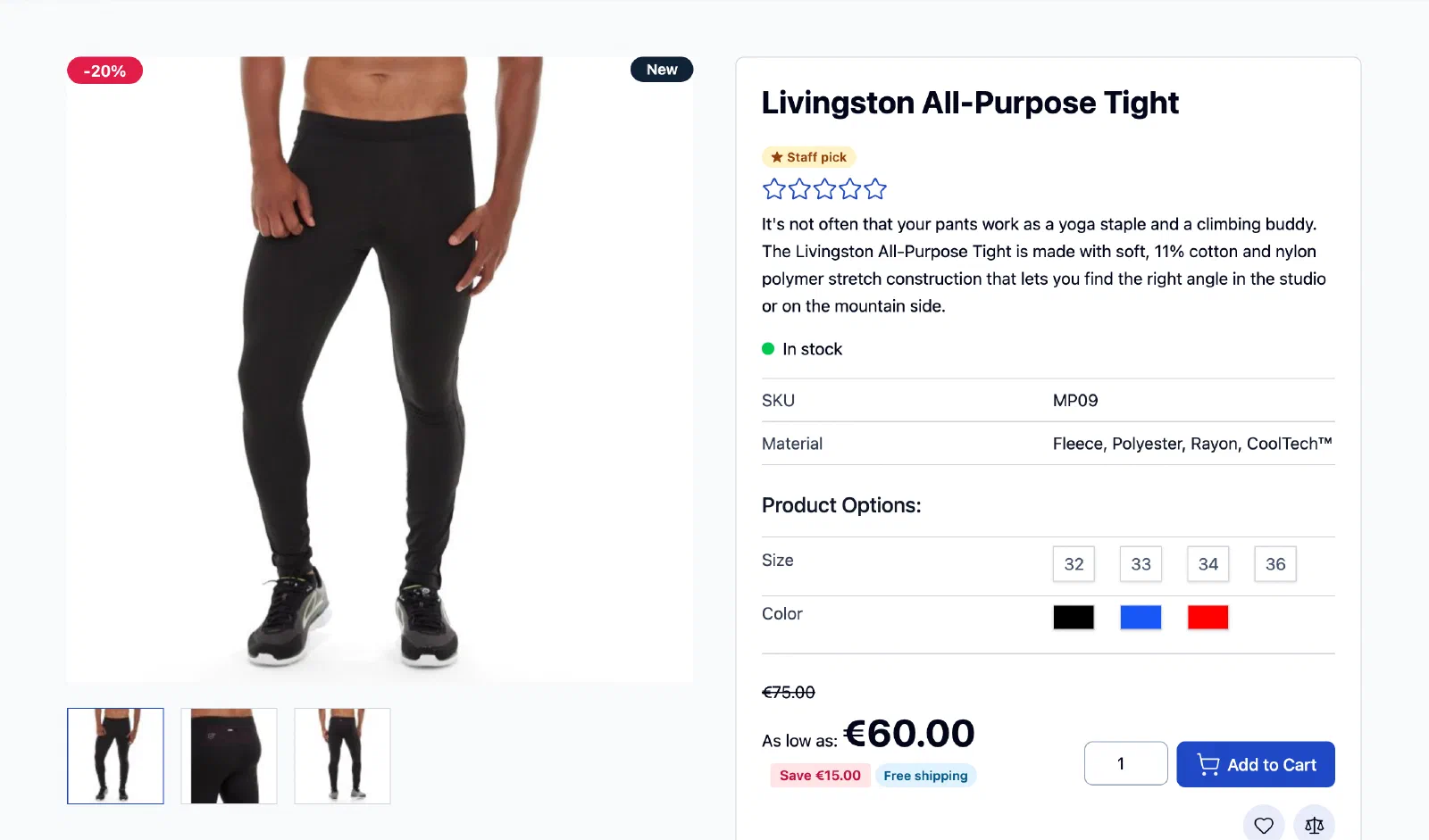
Labels on a Hyvä category page
Discount badges on the image, "Eco friendly" in the corner, "Staff pick" under the name and the saved amount next to the price. All from one query.
Overview
Labels that just work on Hyvä, with zero slowdown
In short
OpenLabel is a free, open-source (MIT) product label extension for Magento 2 and Hyvä. It adds rule-based labels such as "Sale -25%", "New" or "Only 3 left" to category pages, product pages, the cart, the wish list, the compare page and order emails, using one database query per page and no layout shift, and it stays correct under Varnish for every customer group.
Product labels look simple until you run them on a real shop. Category pages load labels for every product, full page cache has to show the right label to the right customer group, and the theme has to stay fast. Most label modules solve this by loading labels with AJAX after the page renders, or by switching off parts of the cache. OpenLabel does neither.
Rules are matched ahead of time. A dedicated indexer evaluates every label’s conditions in SQL and stores which products it applies to, per store view and customer group. When a page renders, OpenLabel asks for the labels of all products on it at once. On a category page with 36 products that is one extra query.
Labels are part of the cached page. Magento’s page cache and Varnish already keep one copy of a page per customer group, the same way they do for prices. OpenLabel renders labels into that HTML, so there is no AJAX, no private content and no flicker. When you save a label, only the pages that show it are purged.
Built for Hyvä, safe for any theme. The Hyvä render package finds the gallery and product card slots on Hyvä 1.4 and 1.5 by itself. Labels are positioned with one small generated stylesheet per store view, so there is no Tailwind rebuild and no inline style. Other themes use two documented calls.
An admin you can use without docs. Start from a one-click starter, pick one of 31 built-in designs, choose where the label goes on a visual picker, and watch the live preview follow every change. The matched products panel shows exactly which products get the label, and explains why when none do.
1
label query per category page
0
layout shift, no AJAX
31
built-in designs, all WCAG AA
24
positions on and around the product
Features
Everything a paid label module does, and then some
Built in releases with a definition of done. Every item below ships in 1.1 today.
Fast by design
A dedicated indexer matches rules in SQL ahead of time. The storefront asks for labels once per page, for every product on it, including configurable parents.
One extra query for a category page with 36 products
Partial reindex on product, price, stock and review changes
Hourly job for schedule starts and ends, no full reindex
Correct under full page cache
Labels are part of the cached HTML. Varnish and the built-in page cache keep one copy per customer group, as Magento already does for prices.
No AJAX and no private content
Saving a label purges exactly the pages it changes
Hyvä product card caches are cleaned too
Labels where shoppers look
Place labels on the image, in the band around it, or next to the price, Add to Cart and the product name.
9 positions on the image and 12 around it
Next to the price, next to Add to Cart, under the name
Cart, mini cart, wish list, compare and order emails
Positions mirror automatically in right-to-left stores
Rules merchants already know
Quick switches cover the common cases. The full rule tree from cart price rules handles everything else.
On sale, new, low stock, out of stock, well rated
Bestseller, most viewed and ships free
Any attribute, category, SKU, attribute set or type
Store views, customer groups, schedule and priority
31 designs, all WCAG AA
Text, shape and image labels with a live contrast check. Sizes per phone, tablet and desktop, CSS-only animations that switch off for reduced motion.
Pill, ribbon, corner, circle and rectangle shapes
PNG, JPG, GIF, WebP, AVIF and sanitized SVG
Tooltips and click-through links, CSS only
Custom CSS per design and globally, behind its own permission
Variables that fill themselves in
Label text can show the real discount, stock or rating of each product, formatted for the store's locale.
REST create, read, update and delete for labels and designs
GraphQL openlabel_labels on every product
One-command import from the open-source Smile module
Ready for every store view
Text per store view, one generated stylesheet per store view and label packs in six languages.
English, German, French, Spanish, Dutch, Italian
Store-view and website scope settings
Labels follow the chosen variant of a configurable product
Compare
How it compares with the paid modules
Line by line against the two best-known paid label modules.
Feature comparison of OpenLabel with Amasty and Mirasvit product label modules
Feature
OpenLabel 1.1
Amasty Product Labels
Mirasvit Product Labels
Price
Free, MIT
Paid
Paid
Hyvä
✓ native render package, included
✓
✓
Text, shape and image labels
✓
✓
✓
Built-in designs
31, all WCAG AA contrast
✓ ready-made pack
✓
Size per phone, tablet, desktop
✓
Not in docs
Not in docs
Positions on the image
9
9
9
Positions around the image (above, below, left, right)
12
Not in docs
Not in docs
Next to the price, next to Add to Cart, under the name
✓
✓
Not in docs
Cart and mini cart
✓ (Hyvä)
Paid add-on
Not in docs
Wish list
✓
Not in docs
Not in docs
Order, invoice, shipment and credit memo emails
✓
Not in docs
Not in docs
Conditions: bestseller, most viewed
✓
Bestseller as add-on
Not in docs
Condition: ships free
✓
Not in docs
Not in docs
Configurable products: label follows the chosen variant
✓
Not in docs
✓
Live countdown
✓
Separate module
Not in docs
Tooltip
✓ (hover, keyboard focus, touch)
✓
Not in docs
Label texts translated
EN, DE, FR, ES, NL, IT
EN, DE
Not in docs
Live preview and matched-products count in the admin
✓
Count
Count
Labels on the product edit page, assign by hand
✓
Not in docs
Not in docs
Cached per customer group in Varnish, no AJAX, zero layout shift
✓
Not in docs
Not in docs
GraphQL (storefront)
✓
✓
Not in docs
REST API
✓ create, read, update, delete
✓
Not in docs
Export and import (JSON, CLI)
✓
Not in docs
Not in docs
Checkout
No (Hyvä Checkout planned on request)
Paid add-on
Not in docs
Competitor columns come only from their public documentation and product pages (October 2026), never from their code. "Not in docs" means no mention was found, not that the feature is missing. Corrections are welcome as an issue.
Compatibility
Supported versions and technical details
Supported platforms
Platform
Versions
Magento Open Source, Mage-OS, Adobe Commerce
2.4.7, 2.4.8, 2.4.9
PHP
8.2, 8.3, 8.4
Hyvä default theme
1.4.x and 1.5.x, tested end to end on every change. 1.3.x best effort.
MSI
Optional. Stock conditions use MSI stock when present, legacy stock otherwise.
Other themes
The core package works with any theme through two documented calls. A Luma render package is planned for 1.2.
Technical specifications
Spec
Value
Latest version
1.1.0 (12 October 2026)
License
MIT
Composer package
iranimij/openlabel-hyva-bundle
Packages inside
iranimij/openlabel (core), iranimij/openlabel-hyva (Hyvä render), iranimij/module-base (config tab, no phone-home)
Magento
Open Source, Mage-OS and Adobe Commerce 2.4.7 to 2.4.9
PHPStan level 6, PHPUnit, integration tests and Playwright end to end
Install
Up and running in five minutes
1Install with Composer
$composer require iranimij/openlabel-hyva-bundle
$bin/magento setup:upgrade
$bin/magento openlabel:reindex
That is all on a stock Hyvä theme: no theme changes, no npm run build. In production mode, also run setup:di:compile and setup:static-content:deploy as for any module.
2Create your first label
a.In the admin, open Catalog › OpenLabel › Labels.
b.Click the Sale -{SAVE_PERCENT}% starter. The label is live at once, and the message says how many products it matches.
c.Open a category with discounted products. The badge shows the real discount, for example "Sale -25%".
Yes. The code is MIT licensed and free forever. There is no paid tier, no feature gating and no license key. Income, if any, comes from sponsorship or paid support, never from locked features.
Does it phone home or show ads in the admin?
No. The shared base module only adds a configuration tab and an "installed modules" page. No license checks, no telemetry, no admin notifications.
Do I need to rebuild Tailwind on Hyvä?
No. OpenLabel ships one small generated stylesheet per store view, so it works on a fresh Hyvä install without a Tailwind build.
Will labels slow down my category pages?
A dedicated indexer matches rules ahead of time, so a category page with 36 products costs one extra query. Labels are positioned with CSS, so there is no layout shift and almost no JavaScript.
Are labels correct with Varnish and customer groups?
Yes. Labels are rendered into the cached page, and Varnish and the built-in page cache keep one copy per customer group, the same way Magento handles prices. Saving a label purges only the pages it changes.
Does it work with Luma or a custom theme?
The core package works with any theme through two documented calls. A Luma render package is planned for 1.2.
Can I move my labels from another module?
There is a one-command importer for the open-source Smile product label module today. Importers from Amasty and Mirasvit are planned for 1.2. Labels can also be exported and imported as JSON between environments.
Where do I get help?
Open an issue or a discussion on GitHub. Issues are triaged within seven days. There is no SLA.
Labels on your store in three commands
No theme changes and no Tailwind build on a stock Hyvä theme. Then open Catalog › OpenLabel and click a starter.