Supplier feeds, stock and price files, ERP exports. Saved profiles with column mapping, a dry run that shows every change before anything is written, schedules, and files from SFTP, S3, Google Drive or a REST API. Built on Magento's own import engine.
Built on Magento's import engine
Dry run of every change
Schedules and SFTP
Admin-only
Dry run
Every change field by field before anything is written, and errors with the row number of your own file.
Overview
Imports that are a daily job, not a project
In short
OpenImport is a free, open-source (MIT) import and export extension for Magento 2 and Mage-OS. It adds saved profiles with column mapping, value transforms, a dry run that previews every change field by field, cron schedules and remote sources such as SFTP, FTP, Amazon S3, Google Drive, Dropbox, OneDrive and REST APIs. It writes through Magento's own import engine, so the result is exactly what core import would produce.
Imports go wrong in the same places on every shop. The supplier’s file has its own column names and decimal commas, Magento’s import wants its own CSV layout, and you find out what went wrong only after the catalog has changed. The paid modules fix this for about $199 to $739. OpenImport does it for free.
Built on Magento’s own import engine. OpenImport reads, maps and checks your file, then hands the rows to Magento’s own importer. What lands in the catalog is exactly what core import would produce, proven on Magento 2.4.7, 2.4.8 and 2.4.9, and it keeps working after upgrades. The measured overhead over core import is under 6 percent, and memory stays flat whether the file has 1,000 or 50,000 rows.
See every change before it happens. Every new profile starts with a dry run. The run page lists what would be created, changed, left alone or deleted, field by field, with errors on the row numbers of your own file. Nothing is written until you press Run for real, and a run that would delete or replace more than a limit waits for a typed confirmation.
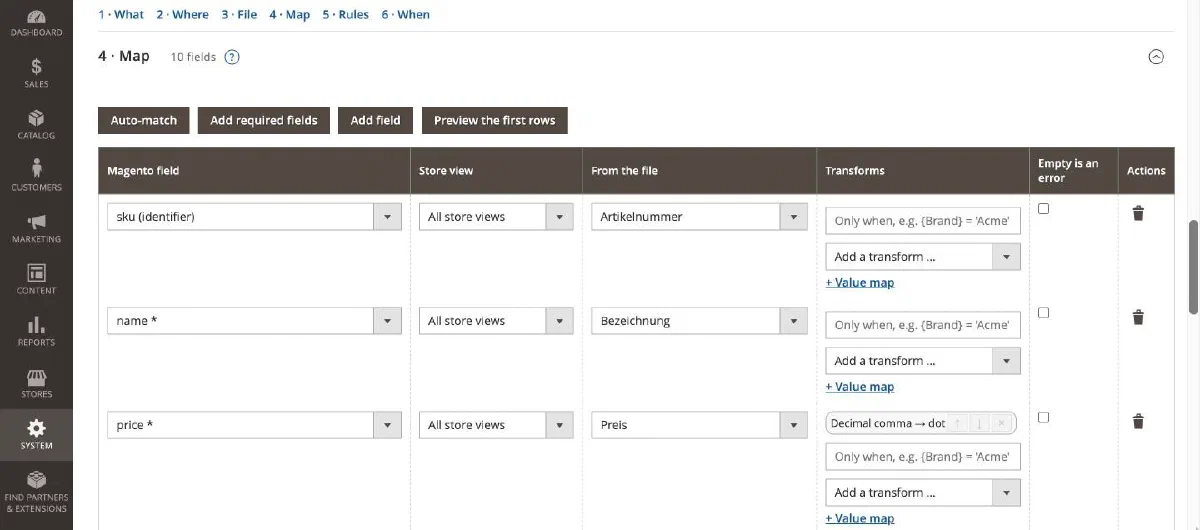
Use the file you already get. Upload a spreadsheet or let OpenImport fetch it from a folder, a URL, SFTP, S3, Google Drive, Dropbox, OneDrive or a REST API. Auto-match maps Artikelnummer to sku and name_de to the German store view’s name, and 21 transforms clean the values on the way in.
Then let it run. Save the profile, set a schedule such as every night at 02:00, and OpenImport runs it through Magento’s cron, sends an e-mail when something fails and keeps a history of every run. Exports work the same way in the other direction.
21
record types, from products to coupons
10
sources, from SFTP to REST APIs
0
rows written by a dry run
<6%
overhead over Magento's own import
Features
What the $599 import modules do, free
Every item below ships in 1.5 today. Anything Magento's own import can do with a CSV, OpenImport does with a mapped file.
A dry run before every import
Every new profile starts with a dry run. It shows what would be created, changed, left alone or deleted, field by field, and writes nothing.
Before and after per field, for example qty: 5 → 10
Errors with your own file's row numbers and an error report
A typed confirmation above a delete or replace limit
Only rows that changed since the last run go to Magento
Mapping instead of Magento's CSV layout
Use the supplier's file as it is. Map columns to fields, add fixed values and store-view columns, and filter rows.
Auto-match with English and German synonyms
Store-view columns: name_de, price_ch
Required fields and row filters with 13 operators
Presets for Shopify, WooCommerce and Magento 1 files
21 transforms and safe expressions
Clean values on the way in. Every transform can apply only when a condition is true.
Trim, decimal comma, maths, rounding to .99, dates
Value maps, find and replace, join and split
Expressions: {price} * 1.19, if(...), round(...)
No eval, parsed once per run; add your own through di.xml
Files from wherever they live
Upload a file or let OpenImport fetch it. Saved connections keep logins encrypted and shared between profiles.
Server folder, URL and published Google Sheets
SFTP, FTP and S3, also R2, Wasabi and MinIO
Google Drive, Dropbox, OneDrive and SharePoint
REST APIs with paging and OAuth 2
Schedules that run exactly once
Presets such as every night at 02:00, or any cron expression. Each due minute runs once, with catch-up after a missed window.
One run per profile at a time
E-mail on failure, or after every run
A system message when cron stops
openimport:doctor checks the setup
Every kind of data, in and out
Products of every type with images, prices, stock and customers through Magento's own importer, plus OpenImport's importers for the rest.
Products, advanced pricing, MSI stock, fast stock and price updates
Customers, addresses, categories, attributes and sets
Orders out and in, shipments with tracking numbers
URL rewrites, price rules and coupons, reviews, CMS pages
Exports to where they are needed
The same profiles work in the other direction, with renamed and transformed columns.
Only new or changed orders, one row per order or per line
An export right after each order is placed
Scriptable and careful
Keep profiles in git, start them from an ERP, and trust what runs on your server.
Profiles as JSON, in the admin and on the command line
REST: start a profile, read the run's status
SSRF guard, no XML entities, zip-bomb limits
Secrets encrypted, formula guard on spreadsheets
Compare
How it compares with the paid modules
Line by line against Magento's built-in import and the best-known paid modules.
Feature comparison of OpenImport with Magento's built-in import, Firebear, Amasty and Xtento
Feature
OpenImport 1.5
Magento Open Source
Firebear Improved I/E
Amasty Import & Export
Xtento
Price
Free, MIT
Free (built in)
$599 + add-ons
$209 to $739 or subscription
About $199 per module
Dry run with a field-level preview of every change
✓
Validate only
No (on their roadmap)
Validate only
Partly
Typed confirmation above a delete or replace limit
✓
No
No
No
No
Only changed rows go to Magento
✓
No
✓
No
No
Schedules (cron)
✓
No
✓
Partly
✓
Column mapping with auto-match, store-view columns
✓
No
✓
✓
✓
Transforms and a safe expression language
✓
No
✓
✓
Partly
CSV, XLSX, ODS, JSON, XML, streamed
✓
CSV
✓
Partly
✓
Upload, folder, URL, SFTP, FTP, Google Sheets
✓
No
✓
Partly
✓
Saved connections, S3-compatible storage
✓
No
✓
Partly
✓
Google Drive with login, Dropbox, OneDrive
✓
No
✓
Partly
No
REST API as source and destination
✓
No
✓
Partly
Partly
Presets for Shopify, WooCommerce, Magento 1 files
✓
No
✓
Partly
No
Order export, only new or changed
✓
No
✓
✓
✓
Order import, historic orders as they are
✓
No
✓
✓
✓
Categories, attributes and sets, CMS pages and blocks
✓
No
✓
✓
No
Health check and cron watchdog
✓
No
No
No
No
License key or subscription
None
None
Key
Key, yearly
Key
Competitor columns come only from the vendors' public product pages and documentation as read on 13 October 2026; nothing was installed or inspected. "Partly" means partly, an add-on or a higher tier. Prices change, check the vendor. Corrections are welcome as an issue.
Compatibility
Supported versions and technical details
Supported platforms
Platform
Versions
Magento Open Source, Mage-OS
2.4.7, 2.4.8, 2.4.9
Adobe Commerce
Should work, not tested.
PHP
8.2, 8.3, 8.4 with ext-zip and ext-xmlreader (both required by Magento anyway)
Cron
Required for schedules and queued runs (bin/magento cron:run every minute).
Themes and Hyvä
Not involved. OpenImport is admin-only.
Technical specifications
Spec
Value
Latest version
1.5.4 (23 October 2026)
License
MIT
Composer package
iranimij/openimport
Packages inside
iranimij/openimport, iranimij/module-base (config tab, no phone-home)
Magento
Open Source and Mage-OS 2.4.7 to 2.4.9
PHP
8.2, 8.3, 8.4
Admin menu
System › Data Transfer › OpenImport › Profiles, Runs and Connections
Import engine
Magento's own ImportExport, proven equal to core import on 2.4.7 to 2.4.9
File formats
CSV and TSV, Excel .xlsx, OpenDocument .ods, JSON, XML with XSLT, inside ZIP, gzip or tar
APIs
REST: start a profile, read a run
CLI
openimport:run, run:status, profile:list, queue:run, profiles:export, profiles:import, secrets:reencrypt, doctor
Translations
en_US, de_DE
Tested with
PHPStan level 6, PHPUnit and Playwright end to end
OpenImport lives in the admin, so the theme does not matter. Magento's cron must run every minute for schedules and queued runs. In production mode, also run setup:di:compile as for any module.
2Run your first import
a.In the admin, open System › Data Transfer › OpenImport › Profiles. Two sample profiles are there already.
b.Pick what to import and where the file comes from, upload or fetch it, and press Auto-match. Artikelnummer becomes sku, Preis becomes price.
c.Press Save and dry run. The run page lists every change field by field. Nothing is written until you press Run for real.
Yes. The code is MIT licensed and free forever. There is no paid tier, no feature gating, no license key and no subscription. There is no paid version either.
Why not use Magento's built-in import?
Core import wants a CSV in its own column layout, imports everything or nothing, and tells you about errors only after you tried. OpenImport keeps core's engine and adds mapping, transforms, dry runs, schedules, remote files, history and alerts.
Is the result the same as Magento's own import?
Yes. Prepared rows go into Magento's own import engine, and the result was proven equal to core's CSV import on Magento 2.4.7, 2.4.8 and 2.4.9. The measured overhead is under 6 percent, with flat memory from 10,000 to 50,000 rows.
Can I check an import before it changes my catalog?
Yes. Every new profile starts with a dry run. It lists every change field by field, with errors on your file's own row numbers, and writes nothing. Runs that would delete or replace more than a limit wait for a typed confirmation.
Where can the files come from?
An upload, a server folder, a web address, SFTP, FTP, Amazon S3 and S3-compatible storage, Google Drive and Sheets, Dropbox, OneDrive and SharePoint, or a REST API. Exports go to the same places or by e-mail.
Does it work with Hyvä or my theme?
The theme does not matter. OpenImport lives in the admin only and adds nothing to the storefront.
Does it phone home?
No. There are no license checks, no telemetry and no admin notifications. The shared base module only adds a configuration tab.
Where do I get help?
Open an issue on GitHub and attach a 10-row sample of your file. Issues are triaged within seven days. There is no SLA.
Your first import in three commands
Then open System › Data Transfer › OpenImport and start from one of the two sample profiles.